
Table of Contents
TI-84 vs TI-83: What Is the Difference?
If you are shopping for a graphing calculator or trying to figure out whether the one you already have is good enough the TI-83 and TI-84 are almost certainly the two models you are comparing. They look similar, they do similar things, and they sit in a similar price range. So what is actually different between them?
The short answer: more than most people realize, but less than the price gap suggests.
This guide compares the TI-84 and TI-83 across every category that matters speed, memory, screen, exam eligibility, software, and price so you can make the right choice for your situation.
Don’t have either calculator? You can use both for free in your browser right now TI-84 online and TI-83 online no download needed.
Quick Answer
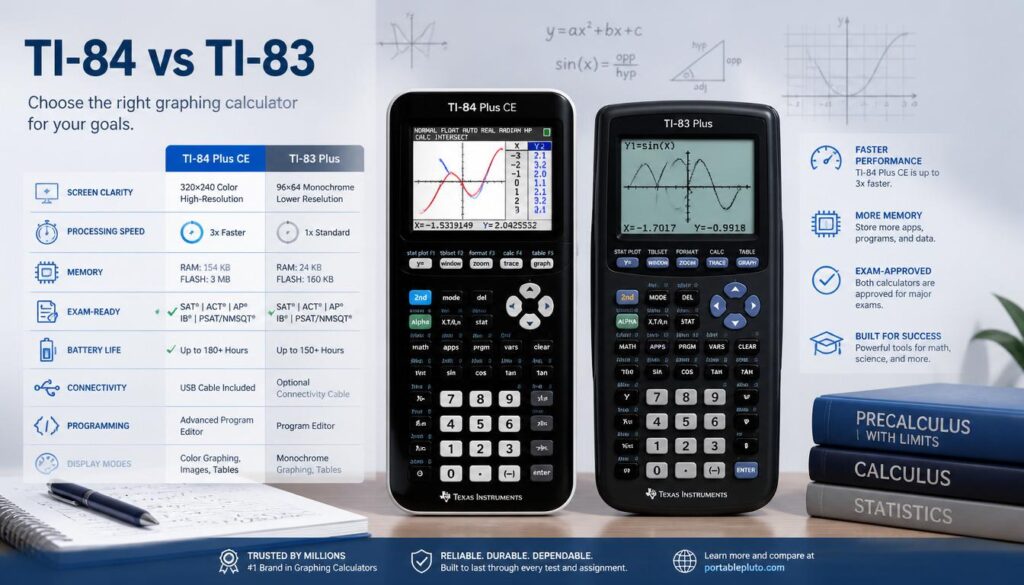
What is the difference between the TI-84 and TI-83? The TI-84 is faster, has more memory, features a better display, includes MathPrint for natural fraction formatting, supports USB connectivity, and receives ongoing software updates from Texas Instruments. The TI-83 is older, slower, cheaper, and no longer actively supported but it still performs every core math and graphing function a student needs. Both are allowed on the SAT, ACT, and AP exams.
TI-84 vs TI-83: Side by Side Comparison
| Feature | TI-83 Plus | TI-84 Plus CE |
|---|---|---|
| Release year | 1999 | 2015 |
| Processor speed | ~6 MHz | ez80 @ 48 MHz |
| RAM | 24 KB | 154 KB |
| Storage | 160 KB flash | 3.5 MB flash |
| Screen | Monochrome, 96×64 px | Color, backlit, 320×240 px |
| MathPrint | No | Yes |
| USB port | No | Yes |
| Rechargeable battery | No (AAA batteries) | Yes (lithium-ion) |
| Weight | 190 g | 201 g |
| Python programming | No | Yes (CE Python edition) |
| Active TI support | No (discontinued) | Yes |
| Price (new) | $50–$80 (used/old stock) | $100–$130 |
| SAT/ACT approved | Yes | Yes |
| Available free online | TI-83 online | TI-84 online |
1. Speed and Processing Power
This is one of the most noticeable real-world differences between the two calculators.
The TI-83 Plus runs on a Zilog Z80 processor clocked at around 6 MHz. The TI-84 Plus CE uses an ez80 processor running at 48 MHz roughly 8 times faster. In practice, this means the TI-84 graphs functions noticeably faster, handles complex programs more smoothly, and refreshes the screen more quickly when you zoom or trace.
For basic calculations arithmetic, algebra, simple statistics you will not notice the speed difference at all. Both feel instant. The difference becomes apparent when you are graphing complex functions, running programs with many iterations, or using apps that require heavy computation.
Winner: TI-84 significantly faster, especially for graphing and programming tasks.
2. Memory and Storage
The TI-83 Plus has 24 KB of RAM and 160 KB of flash storage. This was considered generous when it launched in 1999. By 2026 standards, it is very limited particularly if you want to store programs, download apps, or save large data sets.
The TI-84 Plus CE has 154 KB of RAM and 3.5 MB of flash storage. That is more than 20 times the storage of the TI-83. In practical terms, this means you can store far more programs, keep more data lists, and install a wider variety of apps without running into memory errors.
If you have ever seen an ERR: MEMORY error on a TI-83, it is almost always because the limited storage is full. The TI-84 is far less likely to hit this problem during normal student use.
Winner: TI-84 dramatically more memory and storage in every category.
3. Screen Quality
The display difference is the most immediately visible change between the two calculators.
The TI-83 Plus has a monochrome (black and white) LCD screen with a resolution of 96×64 pixels. It is small, low contrast, and has no backlight making it difficult to read in dim light.
The TI-84 Plus CE has a full color, backlit display with 320×240 pixel resolution. This is roughly 16 times more pixels. Colors make graphing multiple functions much clearer since each function is plotted in a different color instead of all appearing as identical black lines. The backlight means you can use it in any lighting condition.
For students graphing multiple equations simultaneously or working with stat plots, the color display is a genuine advantage not just cosmetic.
Winner: TI-84 color, backlit, high-resolution display is a significant upgrade.
4. MathPrint Natural Fraction and Equation Display
MathPrint is a TI-84 feature that displays fractions, exponents, roots, and equations the way they appear in textbooks with a numerator visually above a denominator, roots shown with the radical symbol, and so on.
The TI-83 does not have MathPrint. It displays everything in a single horizontal line, so the fraction 3/4 just looks like 3/4 and the square root of 9 looks like √(9). This is readable but less intuitive, especially for younger students learning fractions for the first time.
MathPrint on the TI-84 makes it significantly easier to enter and verify complex expressions, reducing input errors.
Winner: TI-84 MathPrint is a meaningful educational advantage.
5. USB Connectivity and Software Updates
The TI-84 Plus CE includes a USB port that allows you to:
- Connect to a computer and transfer programs and files
- Charge the builtin lithiumion battery
- Update the operating system when Texas Instruments releases new versions
- Connect to the TI SmartView emulator software used by teachers
The TI-83 Plus has no USB port. It uses an older link cable and cannot connect via USB. This also means the TI-83 Plus cannot receive OS updates it is permanently running the last version Texas Instruments ever released for it, which was discontinued years ago.
For most classroom use, this does not matter day-to-day. But if your school uses TI software for classroom demonstrations, or if your teacher expects you to be able to transfer files, the TI-84’s USB connectivity is important.
Winner: TI-84 USB, rechargeable battery, and ongoing OS updates are all practical advantages.
6. Exam Eligibility – SAT, ACT, AP
This is the question most students and parents care about most.
Both the TI-83 and TI-84 are approved for:
- SAT
- ACT
- AP Calculus (AB and BC)
- AP Statistics
- AP Chemistry
- AP Physics
- PSAT/NMSQT
- Most state standardized math tests
Neither calculator has a CAS (Computer Algebra System) which would make them ineligible for these exams. Both are on College Board’s and ACT’s approved calculator lists as of 2026.
If your only concern is exam eligibility, both calculators pass. You do not need to upgrade from a TI-83 to a TI-84 for test-taking purposes.
Winner: Tie both are fully approved for all major standardized tests.
7. Software, Apps, and Programming
The TI-84 Plus CE supports a significantly wider range of apps and programs than the TI-83.
Texas Instruments has released dozens of official apps for the TI-84, including the Polynomial Root Finder, Cabri Jr. geometry app, Science Tools, and more. The TI-84 Plus CE Python edition also supports Python programming a skill increasingly tested in computer science courses.
The TI-83 is still compatible with TI BASIC programs and many classic community-made programs, but it cannot run most modern TI-84 apps. Any program written for the TI-84 Plus CE specifically will not run on the TI-83.
For students who want to write their own programs or download tools from the internet, the TI-84 has a much richer ecosystem.
Winner: TI-84 broader app support, Python capability, and a more active development community.
8. Price
This is where the TI-83 has a genuine advantage.
The TI-84 Plus CE retails for $100 to $130 new at most retailers. The TI-83 Plus, while no longer manufactured new, is widely available secondhand for $20 to $50. If you are on a tight budget and need a calculator that passes exams and handles all standard math through AP level, a used TI-83 in good condition is excellent value.
That said if budget is a serious concern, you can also use both calculators for free online:
- Free TI-84 calculator online full TI-84 Plus CE in your browser
- Free TI-83 calculator online full TI-83 in your browser
Both work on phones, tablets, and laptops with no download or account required. Many students use the online versions for homework and studying, and only use the physical calculator on test day.
Winner: TI-83 significantly cheaper, especially used. But the free online versions eliminate this difference entirely for non exam use.
Which Calculator Should You Choose?
Here is a simple decision guide based on your situation:
Choose the TI-84 Plus CE if:
- You are buying a new calculator and budget allows
- Your school or teacher specifically recommends the TI-84
- You want a color screen and rechargeable battery
- You plan to use apps or write programs
- You are in AP Statistics or AP Calculus and want the clearest possible graphing experience
Choose the TI-83 if:
- You already own one it does everything you need through AP level
- You can find a used one at a significant discount
- You are on a tight budget and exam performance is your only goal
- A family member or friend is passing one down to you
Use the free online version if:
- You need a calculator for homework, studying, or practice
- You want to try before you buy
- You forgot your physical calculator and need one now
- You are using a Chromebook, school laptop, or phone
Do the TI-83 and TI-84 Work the Same Way?
For the vast majority of what students do in math class, yes. The button layouts are nearly identical, the menu structures are the same, and every core function graphing, statistics, algebra, trigonometry, matrix operations works identically on both calculators.
If you know how to use a TI-83, you already know how to use a TI-84. If you learn on a TI-84, every skill transfers directly to a TI-83.
The only areas where they diverge in actual use are the MathPrint display mode (TI-84 only) and app compatibility (TI-84 has more options). For everything covered in a standard high school or college math course, they are functionally equivalent.